


Icelandair
4.2146.00 Reviews
App Specs
- Version
- 4.5.2
- Updated On
- License
- Free
- Downloads
- 500,000+
- Developer
- Icelandair
- Categories
- Travel & Local
- Platform
- Android
Screenshots


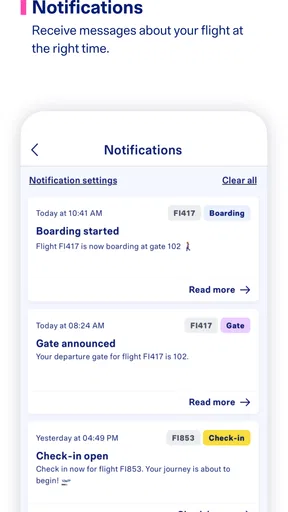
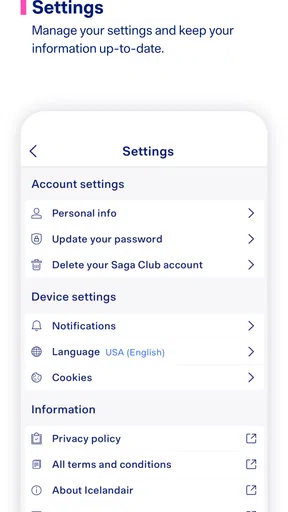
 Analysis by AppCompare
When I travel with Icelandair, I want the airline’s app to reduce small decisions rather than create another task to manage. That is the main lens I used here. Icelandair is a free travel app from Icelandair for Android, aimed at helping passengers handle their journey from a phone instead of moving between several separate tools. It sits in the Travel & Local category, carries an Everyone age rating, and has built a solid audience with over 500 thousand installs.
My overall impression is practical rather than flashy. The app makes the most sense when I am already flying with Icelandair and want airline-specific information in one place. It is less compelling as a general trip planner, and it should not be judged like a full travel marketplace. Its value comes from being close to the airline journey itself: preparing before departure, checking details while plans are fresh, and returning to the same place when I need reassurance.
How Icelandair feels during a real trip
The first useful distinction is between an airline companion and a broad travel app. A general travel service may be better for comparing carriers, finding hotels, building an itinerary across several companies, or keeping unrelated bookings together. Icelandair is more focused. If my flight is operated by Icelandair, that focus can be an advantage because I am not sorting through features designed for airlines I am not using.
I would describe the app as a journey-management tool rather than a replacement for every travel website. That matters before downloading it. Someone planning a multi-airline holiday may still need another service for the wider picture, while an Icelandair passenger can reasonably keep this app alongside a maps app, a hotel app, or a travel wallet. The best experience comes from giving each tool a clear job instead of expecting one app to manage the entire trip.
The developer is Icelandair, which gives the app a direct connection to the airline rather than making it a third-party booking layer. In everyday use, that makes the app feel most relevant around an existing Icelandair booking. I find that reassuring when I want to check my travel arrangements, but it also means the app’s usefulness naturally depends on whether Icelandair is part of my journey.
What I expect when opening it
I do not open an airline app for entertainment or exploration. I open it because I need an answer quickly: what is happening with my journey, where should I look next, or what should I have ready before leaving home? That sets a high standard for clarity. An app can appear simple and still be valuable if it helps me reach the right travel information without making me repeat the same search.
In that role, the Icelandair app is easiest to appreciate when I use it as a reference point. I would install it before a trip, make sure I can access the relevant journey details, and then keep it available for the moments when travel becomes time-sensitive. I would not wait until I am standing in a busy terminal to discover how it works. A short preparation session at home is a sensible way to reduce friction later.
Worth Reading Before You Choose

EA SPORTS FC Mobile 26 Is a Bigger Football Game, but It Takes Time

Flipboard Shows What News Apps Must Do Beyond the Feed

Switching to Android Auto Means Rethinking Your Driving Routine

Google Calendar Makes a Crowded Week Easier to Manage

Ludo King Makes the Most of the Minutes Between Plans

Baby Panda World Brings Quick Play to Modern Phones, but Its Game Library Feels Busy
One practical habit is to review the trip while I still have reliable internet and enough time to correct a mistake. That means checking the booking information I intend to use, confirming that the app opens normally, and keeping the phone charged before leaving. These are simple steps, but they matter more than chasing a polished interface when travel plans are already under pressure.
Speed expectations and the cost of waiting
Icelandair is currently at version 4.5.2, and the app has been available since December 5, 2019. Those details suggest an established product rather than a brand-new experiment, but they do not guarantee that every screen will feel equally quick on every phone. My realistic expectation is that ordinary navigation should feel lighter than opening a browser, searching for the airline, and finding the same journey again, while network-dependent information can still take time.
The important distinction is between app responsiveness and travel-data freshness. A screen may open promptly while the information I need still depends on a connection or an update from the airline. I would avoid judging the whole app by one slow moment at an airport, where crowded networks and weak signals can affect almost any travel service. Conversely, I would not assume that a fast launch means every current detail is already available offline.
For a smoother routine, I would open the app before leaving for the airport, not only after arriving. I would also avoid repeatedly closing and reopening it when I am waiting for a journey detail to appear. Repeated retries rarely solve a weak connection and can make the experience feel more unreliable than it is. A calm check at home, followed by a second check closer to departure, is a better workflow.
The app’s free price helps here because I can keep it installed without treating it as a purchase decision. I can download it for one trip, use it during the journey, and decide afterward whether it deserves permanent space on my phone. That is more flexible than a paid travel utility, although the real cost is still attention: I need to know which information belongs in the app and which information should remain in my booking email or another travel document.
Heavy-use moments are where the design matters
The quietest time to use an airline app is at home, and the hardest time is usually when several passengers are doing the same thing while moving through an airport. That is when I care about stability, readable information, and recovery from interruptions more than decorative details. A useful app should tolerate the way people actually travel: one-handed use, low battery, distractions, and an occasional switch to another screen.
A realistic example is a morning departure. I might open the app after leaving home to review my Icelandair journey, lock the phone while walking, then reopen it near the terminal. Later, I may switch to a boarding document, answer a message, or check directions, and return to the app when I need it again. This stop-and-start pattern is a better test of usefulness than browsing every screen in one sitting.
My advice is to avoid making the app your only copy of essential travel information. Keep the booking reference and other important details accessible in the original confirmation or another secure place. That is not a criticism unique to Icelandair; it is sensible travel practice. Phones can run out of power, connections can fail, and passengers can accidentally close the wrong screen. A second route to critical information removes a lot of unnecessary stress.
Another non-obvious trade-off is attention. The app may centralize airline information, but centralization can encourage me to keep checking it instead of deciding what I actually need. I get better results when I use it at specific points: after booking, before leaving, on arrival at the airport, and when plans change. Constant refreshing adds little value and can make a normal journey feel more uncertain.
Reliability, recovery, and what I would do when something goes wrong
The app has an average rating of 4.2 from around 2.1 thousand ratings, with roughly 145 written reviews. I read that as a sign that many passengers find it useful, while also remembering that airline apps are judged during stressful moments. A minor inconvenience can feel much larger when I am late, tired, or worried about a connection. The rating is encouraging, but it is not a promise that every trip will be frictionless.
For me, reliability includes more than avoiding crashes. It means reopening to a sensible place, keeping the journey understandable after I have left the app, and helping me recover when a connection is temporarily poor. I would give the app a fair test by moving between it and other travel tools, locking the phone, and returning later. If I need to repeat a step, I want the app to make that repetition obvious rather than leaving me unsure whether anything worked.
When a screen does not load, my recovery order would be simple: check the connection, wait briefly, reopen the relevant journey area, and use my saved booking information if I need to continue. I would not uninstall immediately or assume the booking itself has disappeared. If the problem affects an urgent airport decision, I would move to Icelandair’s other official support channels or ask airport staff rather than spending valuable time fighting the screen.
This is also where a direct airline app has an advantage over an independent travel organizer. A third-party service may collect many bookings neatly, but the airline’s own app is the more natural place to start when the question concerns an Icelandair journey. The trade-off is breadth: an organizer can be better for a holiday involving several carriers, while this app is the more focused companion for Icelandair passengers.
Device constraints and sensible preparation
The minimum operating-system requirement is Android 7.0, so the app is not limited to only the newest Android phones. That is useful for travelers who keep an older device as a backup or do not upgrade frequently. Still, operating-system compatibility is only one part of the experience. Available storage, battery health, background activity, and the quality of the phone’s connection can all affect how comfortable an airline app feels at the airport.
I would install the app before the travel day and test it on the phone I will actually carry. Using a newer spare phone at home does not tell me much if the airport device is older, nearly full, or prone to aggressive battery saving. I would also avoid leaving the test until the last evening, because an update or sign-in problem is much easier to handle when I am not packing at the same time.
Older hardware may make transitions feel less immediate, especially when several apps are open. A practical solution is to close apps I do not need, charge the phone, and keep the Icelandair app easy to find. I would not expect the app to compensate for a dying battery or a phone that is already struggling with basic tasks. The app can simplify airline access, but it cannot remove the limits of the device underneath it.
Travelers who are careful about phone storage may wonder whether a free airline app is worth installing for a single trip. In my view, it is worthwhile when the flight is with Icelandair and I expect to check the journey more than once. If I am only comparing flights and have not booked, a browser may be enough. If the trip is already confirmed, the convenience of a dedicated place for airline information becomes more convincing.
Who should use it, and who should choose another tool?
I would recommend Icelandair to passengers who already have an Icelandair booking, prefer handling travel from a phone, and want a direct airline-specific reference point. It is especially sensible for people who dislike searching through email every time they need to revisit a journey. Families may also appreciate having a repeatable place to check details, although I would still keep each traveler’s essential documents organized separately.
I would be less enthusiastic for someone who has not decided which airline to use. The app is not the right starting point for broad fare comparison or for building a complete itinerary across unrelated carriers. A general travel service will usually be more appropriate for that stage. Likewise, a traveler who avoids installing airline apps and already has a reliable browser-based routine may not gain enough to justify changing habits.
There is a useful middle ground for mixed trips. I can use a general organizer for hotels, trains, and another airline, then use Icelandair for the Icelandair portion. That avoids forcing one service to handle information it was not designed to manage. The small inconvenience is maintaining two places to look, but the benefit is clearer ownership: the airline app for the airline journey, and the broader tool for everything around it.
My performance verdict after weighing convenience against friction
Icelandair succeeds because it has a clear job. It is free, available to a broad range of Android devices, and backed by an established airline developer. Its audience of over 500 thousand installs and its 4.2 average show that it has become a familiar travel companion for many passengers. I would treat those figures as useful context, not as a substitute for testing it with my own phone and travel habits.
The strongest reason to install it is not feature quantity; it is having the airline journey close at hand when timing matters. The app is most valuable before departure and during the repeated checks that naturally happen around a flight. Its limitations are equally clear: it is not a universal travel planner, it cannot guarantee perfect performance under poor network conditions, and it should not be the only backup for essential documents.
My final recommendation is straightforward. If Icelandair is carrying me, I would install the app ahead of time, test the journey access while relaxed, and keep a second record of important details. I would use it in deliberate checkpoints rather than constantly refreshing it. For an Icelandair passenger, that combination of focus and convenience makes it a sensible companion. For a traveler comparing airlines or coordinating a complicated multi-company itinerary, a broader travel app will probably be the better first choice.
As an Android app in the Travel & Local category, Icelandair feels most successful when I ask it to do one thing well: keep my Icelandair trip easier to follow. It is not a replacement for preparation, connectivity, or common-sense backups, but it can remove repeated searching from an ordinary travel day. That is a modest benefit, yet it is exactly the kind of benefit I notice when the airport is busy and I need the right information without delay.
Pros
- Useful for managing Icelandair bookings
- check-in
- and boarding passes.
- Flight status updates help travelers monitor schedule changes.
- Seat selection and extra baggage options are easy to access.
- Supports Icelandair’s stopover planning between Europe and North America.
- Digital travel documents reduce the need for printed paperwork.
Cons
- Some features may require an Icelandair booking to work properly.
- App performance can vary during busy travel periods or disruptions.
- Fare and add-on prices may change before completing the purchase.
- Customer support options in the app may feel limited for complex issues.
- Not all airport or partner-airline services are managed directly in the app.
FAQs for Icelandair
What can I do with the Icelandair app?
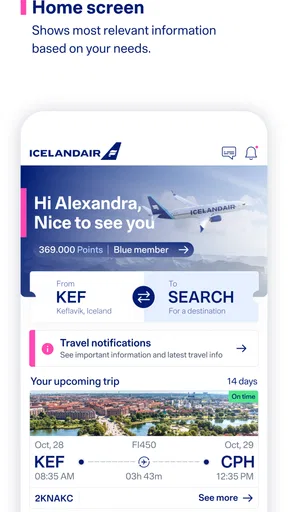
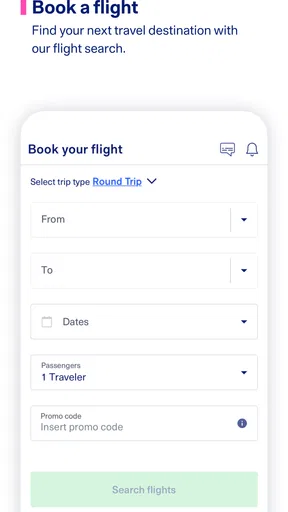
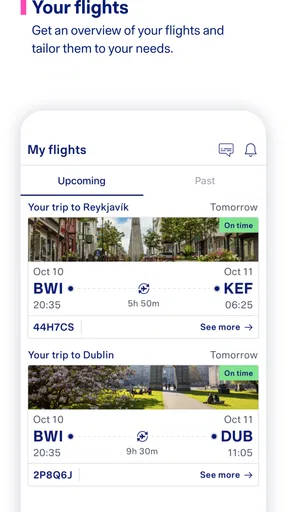
The Icelandair app is designed to manage most parts of your journey from one place. After signing in or entering your booking details, you can review your itinerary, check flight information, complete online check-in when available, access a mobile boarding pass, and receive travel updates. It can also make it easier to manage bookings and view relevant information while traveling with Icelandair.
Can I check in and get my boarding pass through the Icelandair app?
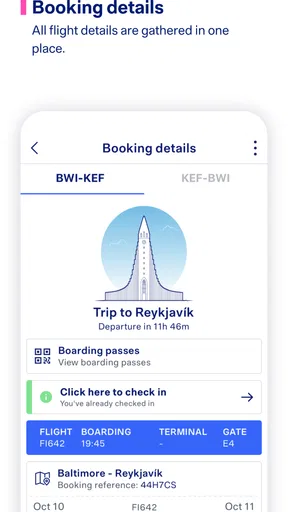
In many cases, yes. The app supports online check-in for eligible Icelandair flights, allowing you to confirm passenger details, select or review seats when available, and receive a digital boarding pass. Check-in availability can depend on your route, airport, ticket type, and travel circumstances. Some passengers may still need to visit an airport desk for document verification or other requirements.
Does the Icelandair app provide live flight status and travel notifications?
The app can provide useful flight information, including scheduled departure and arrival details, gate information when supplied by the airport, and updates related to delays or changes. Notifications may require permission on your device and an active internet connection. Because airport information can change quickly, passengers should also check airport displays and listen for announcements, especially during connections or irregular operations.
Can I manage baggage, seats, and other extras in the Icelandair app?
Depending on your booking and route, the Icelandair app may let you review baggage allowances, manage seat preferences, and access additional travel options connected with your reservation. Some services may be restricted by fare conditions, availability, or the point at which you make changes. Charges can apply, so review the final price and updated booking details before confirming any optional service.
Is the Icelandair app free, and does it work without an internet connection?
The Icelandair app is generally free to download, although normal mobile data or roaming charges may apply when using it away from Wi-Fi. Some information, such as a previously loaded boarding pass or saved itinerary, may remain accessible offline, but not every feature will work without a connection. For a smoother trip, download the app, sign in, and save essential travel documents before leaving reliable internet access.


